
There’s a certain kind of coach who lives in the film room. The one who rewinds the same three seconds of match footage fifteen times, looking for the exact moment the defensive line broke down. If that sounds like you, then Nacsport probably already has your attention.
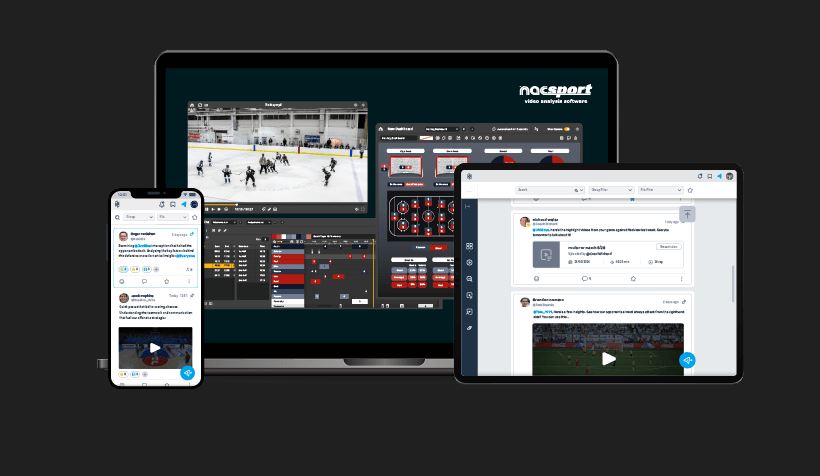
Nacsport is a sports video analysis software that’s built for deep, detailed match and performance analysis. It’s used by professional clubs, national federations, and elite academies across football, basketball, handball, rugby, and several other sports. After putting it through its paces, here’s everything you need to know before deciding whether it belongs in your coaching toolkit.
What Is Nacsport?
Founded in Spain, Nacsport has grown into one of the more well-regarded video analysis platforms in the sports industry. At its core, it’s designed to help coaches and analysts tag, categorize, and review video footage — whether that’s live match footage, training sessions, or opponent scouting material.
Unlike broader sports management platforms that try to do everything, Nacsport goes deep on one thing: video analysis. And that focused approach is both its greatest strength and, depending on your needs, its biggest limitation.
What Nacsport Does Well
Video Tagging That Actually Makes Sense
The tagging system is the heart of Nacsport, and it’s genuinely impressive. You can create fully customized button panels to tag actions in real time — pressing a button every time a player makes a key pass, loses possession, or makes a tackle. Those tags then become instant access points in your footage, so instead of scrubbing through an entire 90-minute match, you jump straight to the moments that matter.
Once you get your panel set up to suit your sport and style, the workflow becomes remarkably fast. Analysts who work at speed under pressure — like those tagging live matches — will appreciate how responsive and customizable everything is.
Presentation and Clip Compilation
One of Nacsport’s standout features is how easy it makes building video presentations. You can pull tagged clips, arrange them into sequences, add drawings and annotations, and export polished video packages for player feedback or tactical meetings. The quality of what you can produce genuinely rivals far more expensive broadcast-style tools.
For teams that present video to players regularly, this is a huge deal. A well-cut clip package lands very differently than a coach trying to describe a moment in words.
Customization Depth
Nacsport gives you a remarkable level of control over how you set up your analysis environment. From the button panel layouts to the data categories, statistical outputs, and export formats — nearly everything is configurable. Experienced analysts who know exactly what they want will feel right at home.
Multi-Sport Flexibility
While Nacsport has deep roots in football, it works across a genuinely wide range of sports. Basketball coaches, rugby analysts, and handball staff all use it effectively. The platform doesn’t force you into a sport-specific template — you build your own, which is either liberating or overwhelming depending on your experience level.
Integration With External Cameras and Devices
Nacsport connects with a range of video capture hardware, which is useful for clubs that record their own footage. The live tagging feature, where you tag events as a match unfolds in real time, is particularly powerful for professional environments where post-match analysis turnaround needs to be quick.
Where Nacsport Falls Short
The Learning Curve Is Real
Let’s not sugarcoat it — Nacsport is not a plug-and-play tool. Setting up your first button panel, understanding the data structure, and figuring out how all the features connect takes time. New users often describe a frustrating first few weeks before things start to click.
Clubs without a dedicated analyst — or at least someone willing to invest serious time learning the software — may struggle to get full value from it. The depth that makes Nacsport powerful for experts can make it feel impenetrable for beginners.
The Interface Looks a Bit Dated
Functionally, Nacsport is solid. Visually, it’s not winning any design awards. The interface has a utilitarian feel that hasn’t evolved much over the years. In an era where sports tech products are increasingly polished, Nacsport can feel a little behind the curve aesthetically, even if it performs well under the hood.
Pricing Can Add Up
Nacsport operates on a tiered licensing model, and the cost can escalate quickly as you add users or upgrade to more advanced versions. For smaller clubs or independent coaches, the investment is meaningful. It’s not the most expensive tool in the market, but it’s not cheap either — especially when you factor in the time needed to get up to speed.
Limited Collaboration Features
While Nacsport is excellent as a standalone analyst tool, its collaborative features are more limited compared to some newer platforms. Sharing clips with players, getting feedback, or working simultaneously with multiple staff members isn’t as seamless as you’d want in a modern team environment.
Mobile Experience Is Basic
The desktop application is clearly where Nacsport lives. The mobile experience, while it exists, is fairly limited. If you’re looking for a platform where coaches and players interact fluidly via mobile, you’ll want to look elsewhere or supplement with another tool.
Nacsport Pricing Overview
Nacsport offers several license tiers — from entry-level options for individual analysts to more comprehensive packages for professional organizations. Pricing is generally quoted on request, and the cost varies depending on the version (Basic Plus, Scout, Elite, etc.) and the number of users.
While exact figures change, expect to invest anywhere from a few hundred dollars annually for basic access up to significantly more for full professional packages. It’s worth requesting a demo and quote directly from their team to understand what level suits your needs.
Who Is Nacsport Best Suited For?
Nacsport is an excellent fit for:
- Professional clubs and national federations with dedicated analysts who need a deep, reliable video analysis environment
- Elite academies that conduct regular opponent scouting and player review sessions
- Independent performance analysts who build custom workflows for specific clients
- Coaches who present video regularly and need clean, professional clip packages
It’s probably not the right first tool for:
- Grassroots or recreational clubs with no dedicated analyst
- Organizations looking for an all-in-one management platform
- Teams that need strong player-facing mobile functionality
Top Nacsport Alternatives
If Nacsport isn’t quite the right fit, here are some solid alternatives worth exploring:
1. Hudl — Best for Team-Wide Adoption
Hudl is arguably the most widely used video analysis platform in team sports, particularly in the US and UK. It’s more accessible than Nacsport, with a cleaner interface and strong mobile functionality. It’s not as customizable at the analyst level, but for teams that want coaches and players using the same platform without a steep learning curve, Hudl is hard to beat.
2. Sportscode (Hudl Sportscode) — Best for Elite Professional Use
If Nacsport is the serious analyst’s tool, Sportscode is the elite one. Used by top-tier professional clubs and national teams worldwide, it’s the gold standard for video analysis depth and speed. It’s also significantly more expensive, which prices it out of most amateur and semi-professional environments.
3. LongoMatch — Best Open-Source Option
LongoMatch is an open-source video analysis tool that punches above its weight. For clubs on a very tight budget, it offers genuine tagging and analysis functionality at no cost. The trade-off is a less polished experience and less support, but it’s a legitimate starting point.
4. Instat — Best for Scouting and Data
Instat combines video footage with a rich statistical database covering leagues around the world. For scouts and analysts who need both video and underlying player data, it’s a strong package. It operates more as a subscription data service than a DIY analysis tool, so the use case is somewhat different.
5. Wyscout — Best for Recruitment and Scouting
Wyscout is the go-to platform for football recruitment teams. It provides access to a massive library of match footage across hundreds of competitions globally, paired with player data and statistics. If your primary need is scouting opposition or identifying transfer targets rather than analyzing your own team, Wyscout belongs at the top of your list.
6. Coach Logic — Best for Player Engagement
Coach Logic is a video review platform built around getting players actively engaged with footage, not just coaches. It’s more collaborative in nature, allowing players to comment on clips and coaches to set individual video tasks. Less powerful than Nacsport for raw analysis, but better for building a video culture throughout the squad.
Frequently Asked Questions (FAQs)
Is Nacsport suitable for individual coaches or only clubs? Nacsport offers individual license options and is used by plenty of independent coaches and freelance analysts. If you’re a coach who takes video analysis seriously, the entry-level versions are accessible. That said, you’ll get the most out of it if you’re willing to invest time in learning the platform properly.
Does Nacsport work on Mac and Windows? Yes, Nacsport is available for both Mac and Windows operating systems. This cross-platform compatibility makes it flexible for different team setups.
Can Nacsport do live tagging during matches? Yes, and this is one of its stronger features. You can set up a button panel and tag events in real time during a live match or training session. The tags become instant clip references the moment the session ends, which dramatically speeds up post-match analysis turnaround.
How does Nacsport compare to Hudl? Hudl is generally more accessible and better suited for broader team adoption, including player-facing features. Nacsport goes deeper on the analyst side — the customization and tagging power is greater. For dedicated analysts, Nacsport often wins. For general team use, Hudl tends to be the easier choice.
Is there a free trial available? Nacsport does offer trial versions of their software. It’s worth downloading and testing before committing to a license, particularly because the platform has enough depth that you’ll want to assess how it fits your specific workflow before paying.
What video formats does Nacsport support? Nacsport supports a wide range of common video formats including MP4, AVI, MOV, and others. For best performance, MP4 with H.264 encoding is generally recommended.
Is Nacsport cloud-based? Nacsport is primarily a desktop-based application, not a fully cloud-based platform in the way some newer tools are. There are sharing and export features, but the core analysis work happens locally. This can be an advantage for working with large video files without relying on internet speed, but a limitation for cloud-first workflows.
Can I use Nacsport for sports other than football? Absolutely. While football is the most common use case, Nacsport is actively used in basketball, handball, rugby, volleyball, hockey, and other sports. The customizable panel system means it adapts to whatever sport you’re analyzing.
Final Verdict
Nacsport earns its 3.9 out of 5 rating by delivering real depth and reliability where it counts most — video tagging, clip production, and customizable analysis workflows. For analysts and coaches who are serious about film work, it’s a powerful tool that rewards the time investment you put into learning it.
The dated interface, steep learning curve, and limited collaboration features keep it from a higher score. But if your primary need is a robust, professional-grade video analysis environment, Nacsport belongs firmly on your shortlist.
It’s not the flashiest tool in the room. But in the hands of a skilled analyst, it gets the job done extremely well — and that, ultimately, is what matters most.
Using Nacsport with your club or as an independent analyst? We’d love to hear your experience in the comments below.